데이터 구성(seaborn data)
2024. 9. 26. 23:32ㆍpython study/sw와 ai 데이터 분석
seaborn data 가져오기
seaborn
- 데이터 시각화 라이브러리
- 내장 데이터셋 22개 제공(sns_get_dataset_names() 명령으로 확인 가능)
import seaborn as sns
df=sns.load_dataset('titanic')
df.head()
데이터 구성 확인하기
df.info()<class 'pandas.core.frame.DataFrame'>
RangeIndex: 891 entries, 0 to 890
Data columns (total 15 columns):
# Column Non-Null Count Dtype
--- ------ -------------- -----
0 survived 891 non-null int64
1 pclass 891 non-null int64
2 sex 891 non-null object
3 age 714 non-null float64
4 sibsp 891 non-null int64
5 parch 891 non-null int64
6 fare 891 non-null float64
7 embarked 889 non-null object
8 class 891 non-null category
9 who 891 non-null object
10 adult_male 891 non-null bool
11 deck 203 non-null category
12 embark_town 889 non-null object
13 alive 891 non-null object
14 alone 891 non-null bool
dtypes: bool(2), category(2), float64(2), int64(4), object(5)- 레코드(행)의 개수: 891개
- 칼럼(열)의 개수: 15개
- 수치형 칼럼의 개수: 8개
- 범주형 칼럼의 개수:7개
데이터 셋 시각화하기
sns.countplot(data=df, x='survived')
예제로 데이터 불러오기
공공 데이터 가져오기
- 기상자료개방포털에서 데이터 가져오기

- 기후 통계에서 조건별 통계로 이동해 준다.
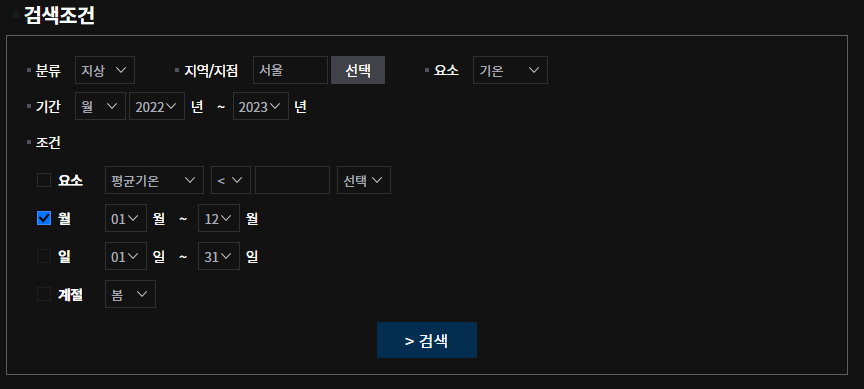
- 검색조건을 다음과 같이 설정해 준다.
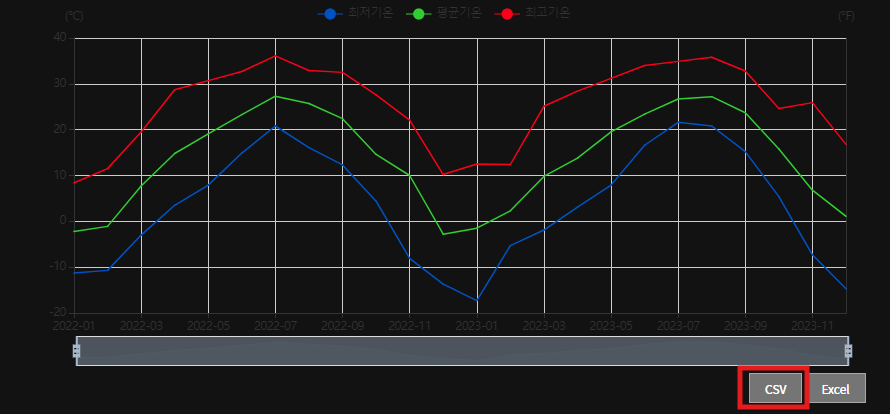
- 다음으로 CSV형식으로 다운로드하여준다.
데이터 정제

- 1행에서 11행까지의 데이터는 필요하지 않기 때문에 삭제해 준다. (python으로도 전처리 가능하지만 지금은 수작업으로)
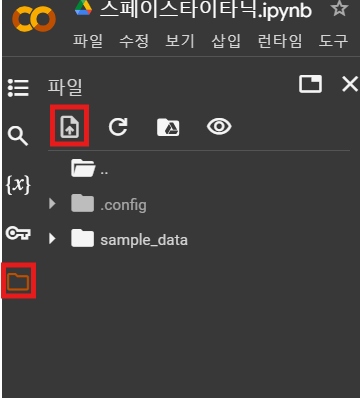
- 그다음으로는 파일 창에 들어간 뒤 상단에 있는 업로드를 눌러서 CSV파일을 업로드해준다.
import pandas as pd
import matplotlib.pyplot as plt
import seaborn as sns

df=pd.read_csv('/content/extremum_20240926231451.csv',encoding ='euc-kr')
df.head()- pandas: 데이터 조작과 분석을 위한 라이브러리
- matplotib: 보통 그래프 시각화를 위한 라이브러리
- read_csv(' ', encoding=' '): CSV파일을 불러오는 명령어로 첫 번째 따옴표 안에 파일 경로를 입력해 준다.
그리고 한국어가 포함된 데이터를 불러오기 때문에 encoding방식은 euc-kr로 지정해 준다.
데이터 구성 확인
df.info()<class 'pandas.core.frame.DataFrame'>
RangeIndex: 32 entries, 0 to 31
Data columns (total 10 columns):
# Column Non-Null Count Dtype
--- ------ -------------- -----
0 지점번호 32 non-null object
1 지점명 24 non-null object
2 일시 24 non-null object
3 평균기온(℃) 24 non-null float64
4 평균최고기온(℃) 24 non-null float64
5 최고기온(℃) 24 non-null float64
6 최고기온일자 24 non-null object
7 평균최저기온(℃) 24 non-null float64
8 최저기온(℃) 24 non-null float64
9 최저기온일자 24 non-null object
dtypes: float64(5), object(5)
memory usage: 2.6+ KB- 열의 개수: 10개
- 행의 개수: 24개
- 수치형 열의 개수: 5개
- 범주형 열의 개수: 5개
'python study > sw와 ai 데이터 분석' 카테고리의 다른 글
| 공공 데이터의 이해 (1) | 2024.09.29 |
|---|---|
| 데이터 분석 도구(colab) & 데이터 기초 (1) | 2024.09.28 |
| 데이터 종류와 구조 (2) | 2024.09.16 |
| 빅데이터와 데이터 분석 (1) | 2024.09.16 |
| 인공지능과 데이터 과학 (4) | 2024.09.16 |