ggplot 패키지
2024. 9. 5. 22:22ㆍ확률 통계/R 데이터 분석
- ggplot은 일반적인 그래프 작성 보다 더 섬세하게 표현할 수 있지만 어느 정도 숙련도가 필요하다.
ggplot 명령문의 기본 구조
ggplot(data=xx, aes(x=x1, y=y1))+geom_xx+geom_yy- 기본적인 구조는 ggplot함수와 다른 여러개의 geom_xx의 함수들이 +로 연결되어 있다.
- ggplot에서 데이터셋을 data에 불러 주고, aes를 통해서 x축의 이름과 y축의 이름을 설정해 준다.
- geom_xx는 어떤 형식으로 그래프를 그릴지 알려주는 데, geom_bar는 bar형태를 그리도록 한다.
막대그래프 작성
library(ggplot2)
month<-c(1,2,3,4,5,6)
rain<-c(55,50,45,50,60,70)
df<-data.frame(month, rain)

ggplot(df, aes(x=month, y=rain))+geom_bar(stat="identity",width=0.7, fill="steelblue")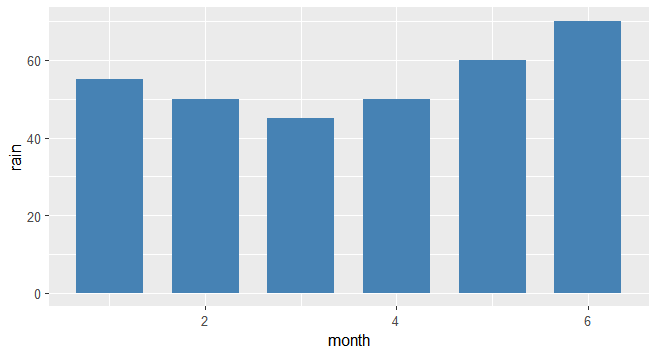
- 기본적으로 df에 month와 rain의 데이터를 합쳐서 data.frame을 만들어 주었다.
- ggplot: 기본적으로 data 매개변수를 df로 설정해 주고, x축과 y축의 이름을 각각 month와 rain으로 해주었다.
- geom_bar: 막대그래프를 작성하는데 사용하는 함수로, stat="identity"로 막대의 높이를 y축에 의해 결정해주었고, width는 0.7, fill로 막대 내부의 색상을 steelblue로 해주었다.
막대 그래프 꾸미기
library(ggplot2)
month<-c(1,2,3,4,5,6)
rain<-c(55,50,45,50,60,70)
df<-data.frame(month, rain)

ggplot(df, aes(x=month, y=rain))+
  geom_bar(stat="identity",
           width=0.7,
           fill="steelblue") +
  ggtitle("월별 강수량")+
  theme(plot.title = element_text(size=25, face="bold", colour = "steelblue"))+
  labs(x="월", y="강수량")+
coord_flip()- ggtile(""): 제목을 지정해 주는 함수이다.
- theme(plot.title = element_text(size=25, face="bold", colour = "steelblue")): 지정된 그래프에 대해서 제목의 폰트 크기, 색등을 지정해 준다. plot.title를 element_text를 통해서 size와 face(글꼴), colour(색상)를 통해서 제목의 요소들을 조정해 준다.
- labs: x레이블과 y레이블을 지정해 준다.
- coord_flip: 막대를 가로로 바꿔준다.
히스토그램 작성
library(ggplot2)
ggplot(data=iris, aes(x=Petal.Length))+
  geom_histogram(binwidth = 0.5)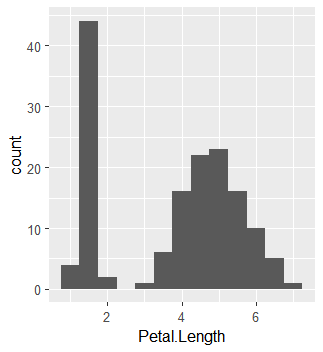
- geom_histogram: 히스토그램을 작성해 주는 함수이다.
- binwidth: 구간의 길이를 조절해 주는 매개변수로 위의 경우는 0.5씩 잘라서 출력해 주었다.
그룹별 히스토그램 작성하기
library(ggplot2)
ggplot(iris, aes(x=Sepal.Width,fill = Species, color=Species))+
  geom_histogram(binwidth=0.5, position="dodge")+
  theme(legend.position = "top")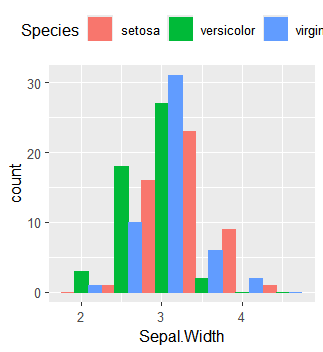
- fill=Species: 품종은 팩터타입이기 때문에 숫자 1,2,3으로 변환가능하다.
- color: 막대의 윤곽선의 색을 지정한다.
- binwidth: 0.5 간격으로 구간을 나눈다.
- position="dodge": 3가지의 품종이 한 그래프에 작성된 되기 때문에 동일 구간에 대해서 3개의 막대가 그려진다. position은 동일 구간의 막대를 어떻게 그릴지 지정해 주는데, dodge는 막대그래프들이 겹치지 않고 병렬로 그려지도록해준다.
산점도 작성
library(ggplot2)
ggplot(iris, aes(x=Petal.Length,y=Petal.Width))+
  geom_point()+
  labs(x="꽃잎길이", y="꽃잎너비")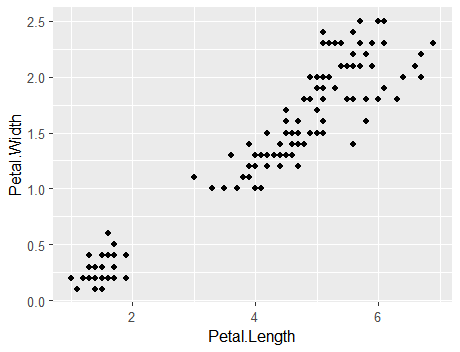
- geom_point: 산점도를 출력해 주는 함수이다.
그룹이 구분되는 산점도 그리기
library(ggplot2)
ggplot(iris, aes(x=Petal.Length,y=Petal.Width,color=Species))+
  geom_point(size=3)+
  ggtitle("꽃잎의 길이와 폭")+
  labs(x="꽃잎의 길이", y="꽃잎의 폭")+
  theme(plot.title = element_text(size=25, face="bold", colour="steelblue"))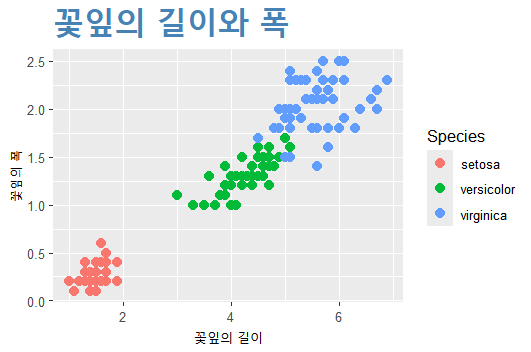
- color=Species: 색상을 팩터 형태로 저장된 Species를 사용하여서 지정해 준다.
- size: 산점도가 표시되는 점의 크기를 의미한다.
- theme: plot.title을 활용하여서 글의 크기와 글꼴, 색상을 지정해 주었다.
- 점의 모양을 다르게 하고 싶다면 shape=Species로 해주면 된다.
상자그림의 작성
library(ggplot2)
ggplot(iris, aes(y=Petal.Length))+
  geom_boxplot(fill="yellow")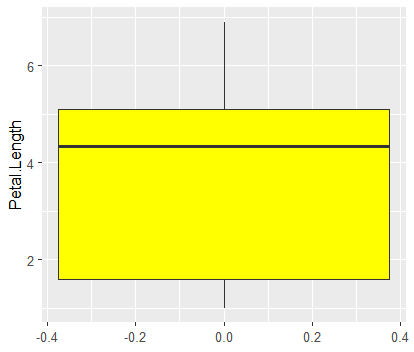
- geom_boxplot: 상자그림을 작성해 주는 함수이다.
그룹별 상자그림 작성하기
library(ggplot2)
ggplot(iris, aes(y=Petal.Length,fill=Species))+
  geom_boxplot()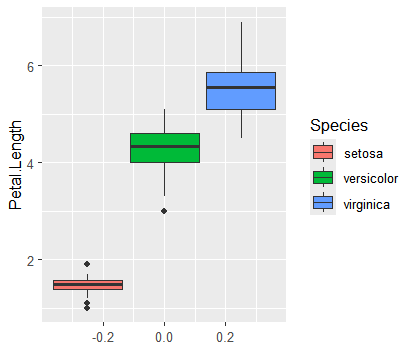
- fill=Species: Species에 저장된 팩터 형태의 숫자를 통해서 색을 입힐 수 있다.
선그래프 작성
library(ggplot2)
year<-1937:1960
x<-as.vector(airmiles)
df<-data.frame(year, x)
ggplot(df, aes(x=year, y=x))+
  geom_line(col="red")+
  labs(x="연도", y="빈도")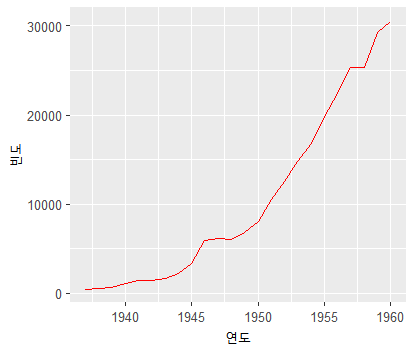
- geom_line: 선그래프를 작성해주는 함수이다.