2024. 7. 8. 21:05ㆍ컴퓨터학 개론
github에 커밋하기
$ git config --global user.name "github 사용자 이름"
$ git config --global user.email "깃허브 계정"
$ git config --list
user.name= github 사용자 이름
user.email= 깃허브 계정
core.editor=vim
$ mkdir workspace //디렉터리 생성
$ cd workspace/
$ git clone 깃허브 주소 (ex) https://github.com/ssjjss1/hello_test.git
/.
Cloning into 'hello_test'...
remote: Enumerating objects: 3, done.
remote: Counting objects: 100% (3/3), done.
remote: Total 3 (delta 0), reused 0 (delta 0), pack-reused 0
Receiving objects: 100% (3/3), done.
./
$ cd hello_test/
$ touch hello.c
$ sudo snap install gedit
$ gedit hello.c //c언어 파일 저장 해주기!
$ git status //git 상태 확인
On branch main
Your branch is up to date with 'origin/main'.
Untracked files:
(use "git add <file>..." to include in what will be committed)
hello.c //untracked 상태에 있음(올려 줘야함)
$ git add hello.c //track 상태에 올려주기
$ git commit -m "first c code" // 커밋 ㄱㄱ
$ git remote set-url origin https://<token 주소>@github.com/github 사용자 이름/파일 이름
$ git push origin main
Enumerating objects: 4, done.
Counting objects: 100% (4/4), done.
Delta compression using up to 8 threads
Compressing objects: 100% (3/3), done.
Writing objects: 100% (3/3), 337 bytes | 337.00 KiB/s, done.
Total 3 (delta 0), reused 0 (delta 0), pack-reused 0
To https://github.com/ssjjss1/hello_test
b180837..14dcb2f main -> main
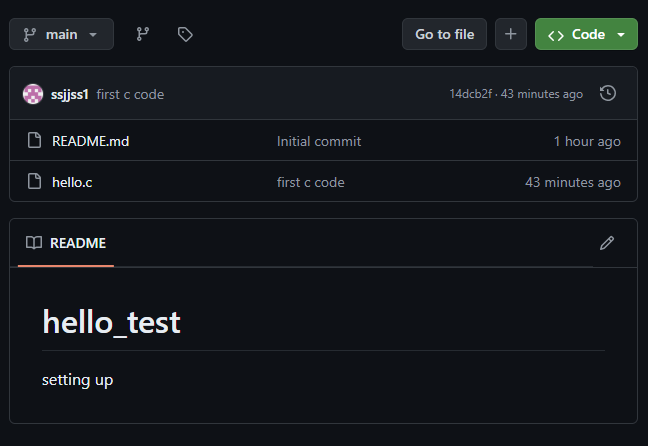
이제 gihub로 돌아가면 commit 되어 있음!
'컴퓨터학 개론' 카테고리의 다른 글
| 데이터 통신과 네트워크 (0) | 2024.07.12 |
|---|---|
| 알고리즘 (0) | 2024.07.11 |
| 자료 구조 (0) | 2024.07.11 |
| 컴퓨터 과학 개론 (0) | 2024.06.27 |